executeStream
The executeStream method prioritizes filling in the variables in the "Prompt", then forwards it to the large AI model for processing, returning the results in a stream format.
async executeStream(
    input: Record<string, string>,
    parameters?: {
        temperature?: number;
        topP?: number;
        stop?:
            | []
            | [string]
            | [string, string]
            | [string, string, string]
            | [string, string, string, string];
        maxTokens?: number;
        presencePenalty?: number;
        frequencyPenalty?: number;
    }
): Promise<ReadableStream<string>>;
Reference
Overview
Assume your LLMExecutor is configured as shown in the following diagram.
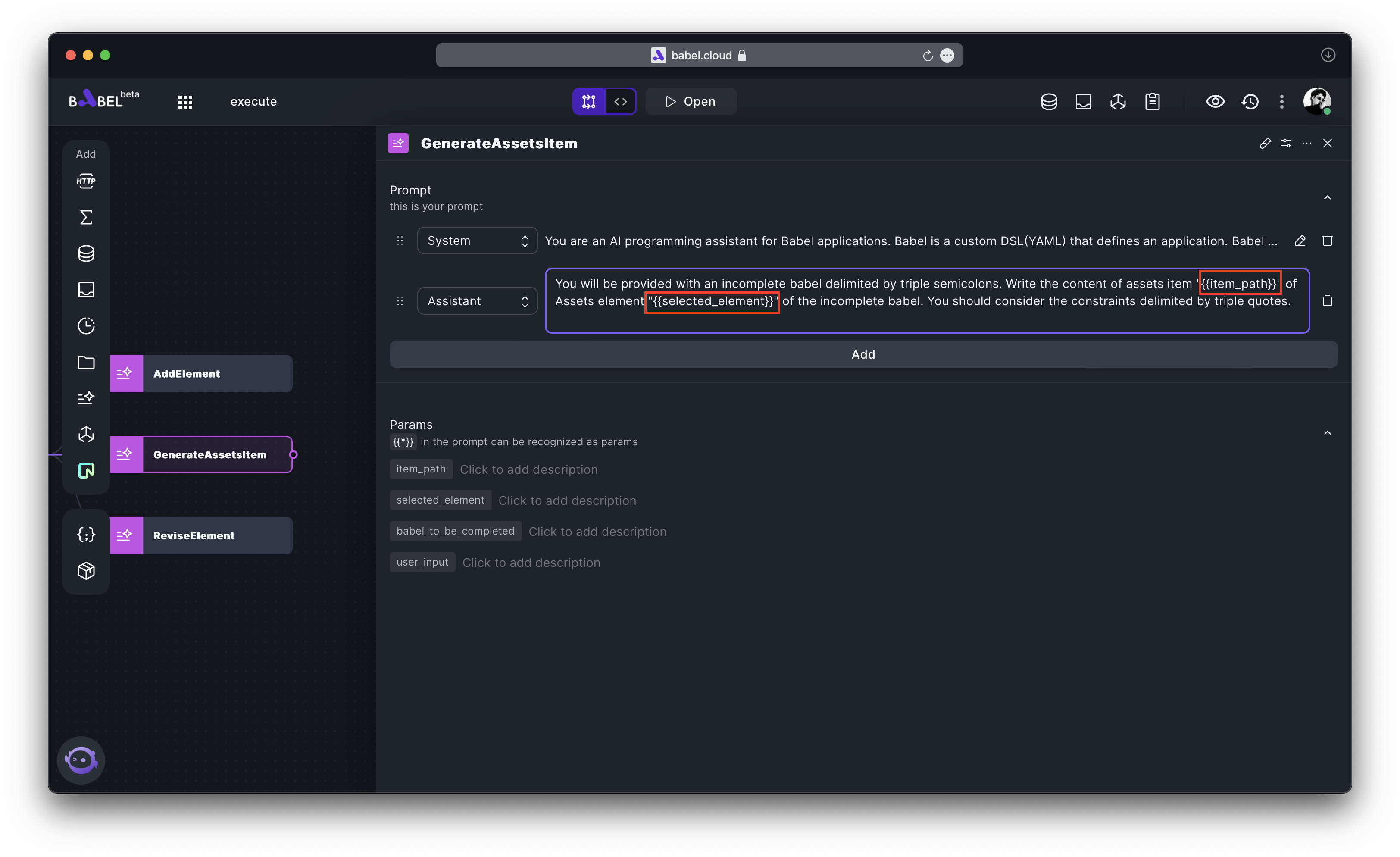
You can utilize it in the following manner.
import { myLLMExecutor } from "#elements";

...

const input = {
  "item_path": "the_value_of_your_actual_variable",
  "selected_element": "the_value_of_your_actual_variable",
  "babel_to_be_completed": "the_value_of_your_actual_variable",
  "user_input": "the_value_of_your_actual_variable",
};
const result = myLLMExecutor.executeStream(input);
let content = "";
for await (let chunk of result) {
    content += chunk
}
console.log(content)

...
Parameters
input: Key-value mapping of "Params".parameters: Optional parameters, containing the following fields:temperature: (optional) What sampling temperature to use, between 0 and 2. Higher values like 0.8 will make the output more random, while lower values like 0.2 will make it more focused and deterministic.topP: (optional) An alternative to sampling with temperature, called nucleus sampling, where the model considers the results of the tokens with top_p probability mass. So 0.1 means only the tokens comprising the top 10% probability mass are considered.stop: (optional) Up to 4 sequences where the API will stop generating further tokens. The returned text will not contain the stop sequence.maxTokens: (optional) The maximum number of tokens to generate in the completion. The token count of your prompt plus max tokens cannot exceed the model's context length.presencePenalty: (optional) Number between -2.0 and 2.0. Positive values penalize new tokens based on whether they appear in the text so far, increasing the model's likelihood to talk about new topics.frequencyPenalty: (optional) Number between -2.0 and 2.0. Positive values penalize new tokens based on their existing frequency in the text so far, decreasing the model's likelihood to repeat the same line verbatim.
Returns
The executeStream method returns a value in the form of a string stream.
Examples
Display the response of LLM with the quality of a printer.
Create an HTTP Element that returns the response data from the LLM model in a stream format, with the path set to /api/execute/stream.
import * as Koa from "koa"
import { myLLMExecutor } from "#elements"
export default async function (request: Koa.Request, response: Koa.Response, ctx: Koa.Context) {
  	const input = {
      "item_path": "the_value_of_your_actual_variable",
      "selected_element": "the_value_of_your_actual_variable",
      "babel_to_be_completed": "the_value_of_your_actual_variable",
      "user_input": "the_value_of_your_actual_variable",
    };
    return myLLMExecutor.executeStream(input);
}
Create an Assets named "Public", and write an HTML page that is designed to read the data returned from the backend in a stream format.
<h3 id="executeStream"></h3>
<script>
  async function executeStream() {
    const response = await fetch('/api/execute/stream');
    const reader = response.body.getReader();
    const decoder = new TextDecoder('utf-8');
    let result = '';
    while (true) {
      const { done, value } = await reader.read();
      if (done) {
        break;
      }
      result += decoder.decode(value);
      document.getElementById('executeStream').innerHTML = result;
    }
  }
  executeStream();
</script>